WITHOUT PREPCOACH
- Add a meal? Redistribute every meal manually
- Need a deficit or surplus? Recalculate every portion
- Swap a meal? Match the macros by hand
- Build a meal plan? Add up every meal's macros
 Start Your 14-Day Free Trial
NUTRITION PLANNING FOR CONTEST PREP, FITNESS, AND NUTRITION COACHES
From automated macro distribution and one-click calorie adjustments to intelligent meal swaps, built-in client Check-Ins, messaging, and a free companion app for every client, PrepCoach streamlines every part of your coaching workflow. Best of all, just one $40-per-month client covers your monthly subscription.
Client app access is included with every plan.

Build plans, manage clients, review check-ins, and make adjustments from anywhere.
SEE THE WORKFLOW
PrepCoach automatically handles the math and streamlines your workflow — so you can build and adjust precise nutrition plans in a fraction of the time.
THE MANUAL RECALCULATION PROBLEM
PrepCoach wasn't created to replace nutrition coaching—it was created to eliminate the repetitive work behind it. After years of manually calculating macros, adjusting portions, and rebuilding meal plans every time a client's nutrition changed, it became clear there had to be a faster way. PrepCoach was built to automate those calculations so coaches can spend less time doing math and more time coaching their clients.
WITHOUT PREPCOACH
WITH PREPCOACH
Apply your changes across every meal, alternative, and daily total automatically.
✓ Meals alignedBuilt around the real coaching workflow
PrepCoach automates the repetitive calculations around your decisions. It does not generate a coaching strategy or replace your judgment.
Targets Mode
Use Targets Mode when you want the daily numbers to drive the meal plan structure.
Enter calories and macros, then choose how many meals you want.
PrepCoach instantly distributes your macros across every meal.
Fill each meal using your saved meal templates and food database.
Coach-controlled precision
You define the strategy. PrepCoach handles the repetitive calculations. Set your nutrition targets, build meal plans faster with intelligent automation, and make calorie adjustments in seconds—without sacrificing precision.
Smart Meal Flexibility
PrepCoach makes meal changes easier while helping coaches keep every plan aligned with the structure and targets they created.
Smart Meal Flexibility
Replace a client’s current meal with any saved meal from your meal database. PrepCoach automatically matches the replacement to the meal’s macro targets.
Select the meal you want to replace, then click the Swap Meal button.
Select any meal from your meal database to use as the replacement.
PrepCoach automatically adjusts the replacement meal to match the meal’s macro targets.
One connected client experience
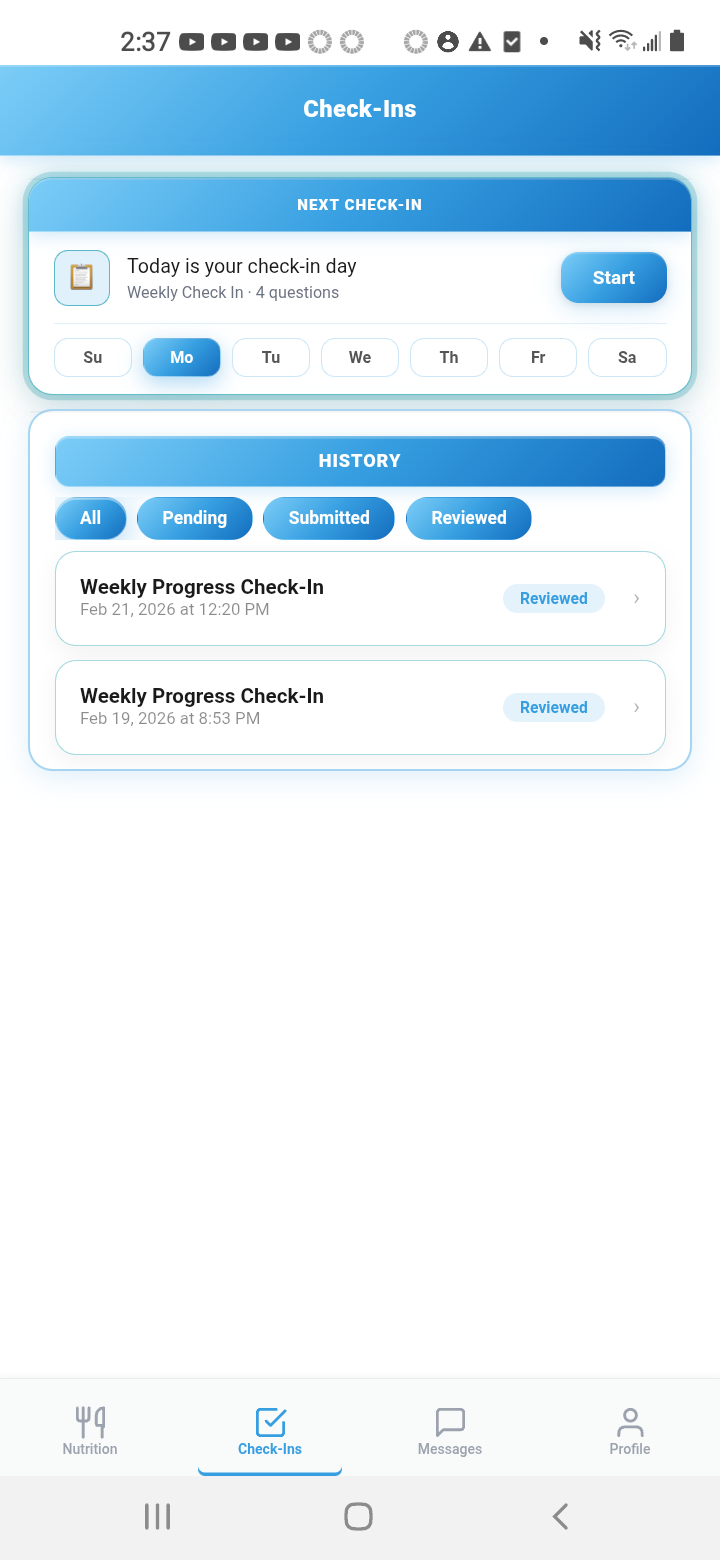
Clients get their meal plans, alternatives, Check-Ins, progress, and coach messaging in one mobile app without adding another paid tool to your stack.
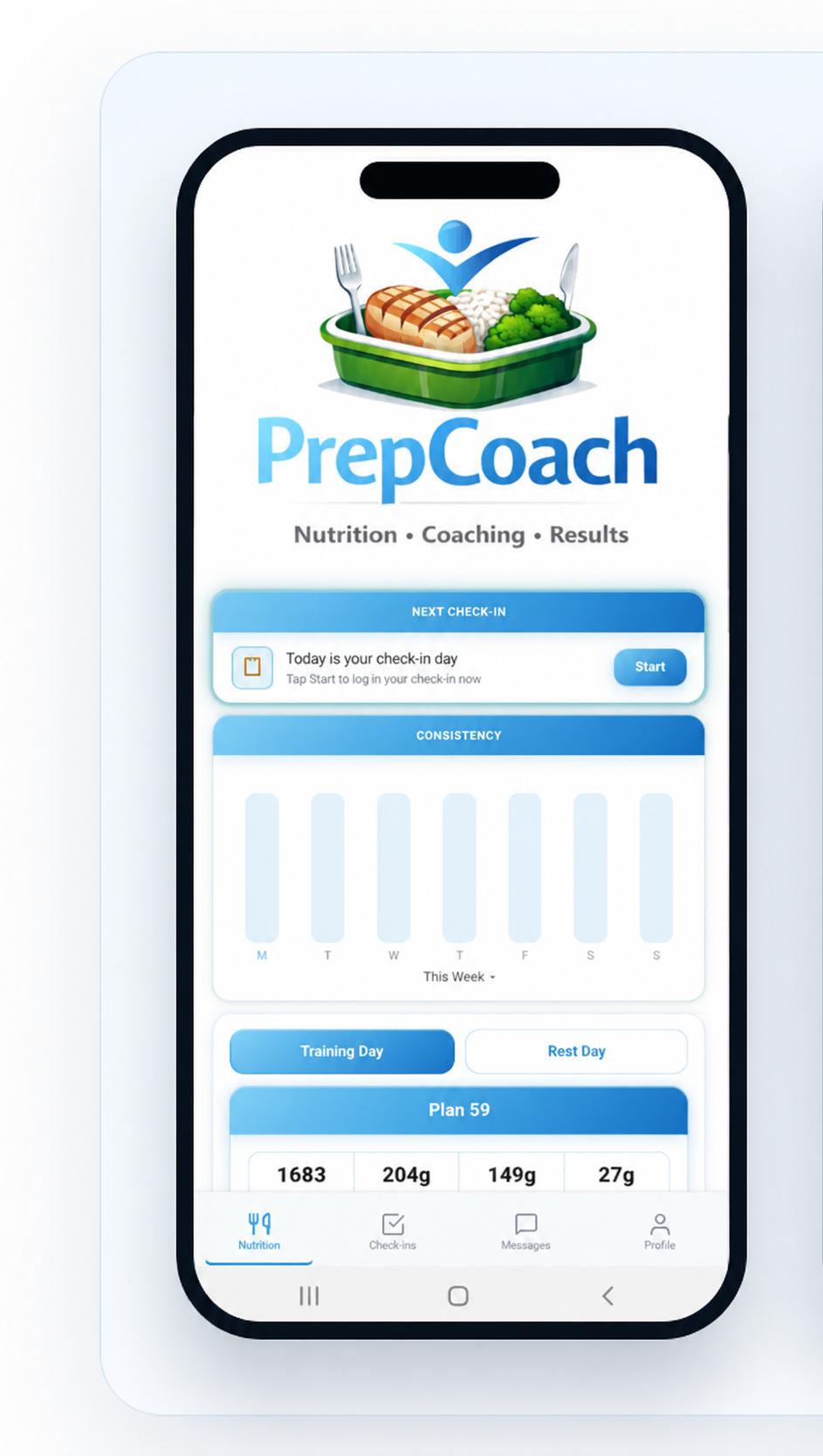
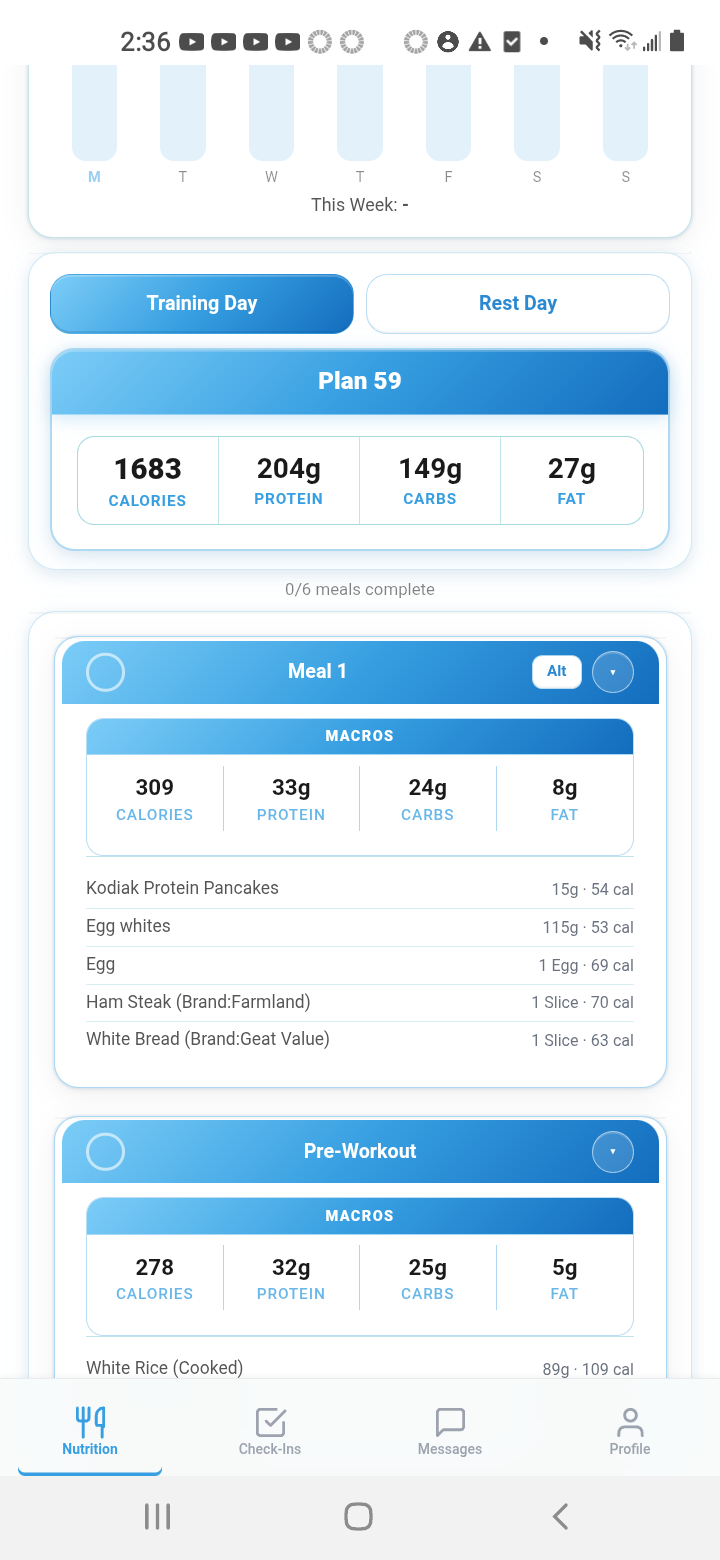
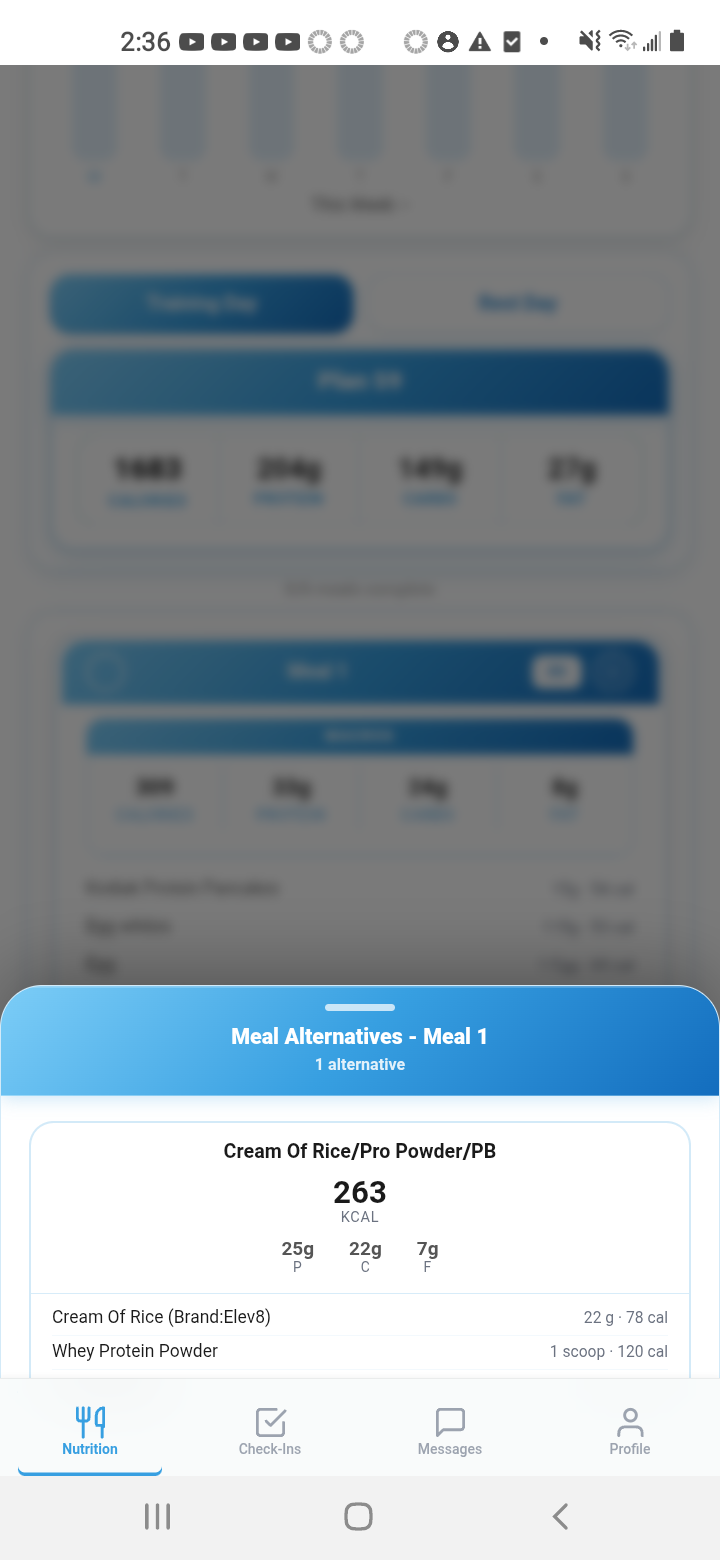
Training, rest, and custom day plans stay organized on the client’s phone.
Weekly Check-Ins and progress live beside the nutrition workflow.
Keep plan questions and coaching conversations in the same experience.
From coaches using PrepCoach
“At first I thought the Targets Mode would just be a small convenience feature, but it’s honestly become one of the biggest time-savers in my workflow. Being able to set macros and instantly have meals auto-match the targets removes so much manual work and makes building plans feel incredibly efficient compared to other apps I’ve used.”
“Before PrepCoach, adding or removing a meal meant manually recalculating and redistributing macros across the entire plan at a time. Now with Auto Split, everything adjusts automatically in seconds. It’s saved me an insane amount of time and makes updating client plans way more efficient.”
“Smart Meal Templates, along with Smart Meal Swaps and Alternatives, have completely changed the way I build plans. I can save my go-to meals as templates and drop them into any client’s plan in seconds—PrepCoach handles the macros and portion sizes automatically. And when a client wants options, I can create smart swaps and alternatives that match the meal’s macros instantly. It keeps every plan flexible for my clients while saving me hours of manual work each week.”
Simple monthly pricing
Every plan includes PrepCoach’s core nutrition-planning workflow and client app access.
Up to 10 active clients
Up to 50 active clients
Up to 100 active clients
Questions before you start
PrepCoach is workflow software for coaches managing client nutrition. It supports your decisions rather than making them for you.
PrepCoach streamlines the entire meal planning process without taking control away from you. Enter your client's calorie and macro targets, choose how many meals you want, and PrepCoach automatically distributes those macros across the day. Then simply add your meal templates. Every ingredient and serving size is automatically adjusted to match each meal's assigned macros, eliminating manual calculations while keeping you in complete control.
Yes. Build your own food database and create unlimited meal templates using the foods you already recommend. When you add a template to a meal, PrepCoach automatically adjusts every ingredient and serving size to match that meal's assigned macros, so you never have to rebuild meals from scratch.
No. PrepCoach isn't an AI meal plan generator—it's a coaching platform. You make every nutrition decision based on your client's goals, preferences, and needs. PrepCoach simply eliminates the manual calculations, portion adjustments, and repetitive work that normally slow you down.
While we could have relied on AI to generate meal plans, we believe the best nutrition plans come from an experienced coach, not an algorithm. That's why PrepCoach enhances your coaching instead of replacing it.
PrepCoach is built for any coach who creates nutrition plans for clients. Whether you coach bodybuilding, powerlifting, CrossFit, weight loss, endurance sports, strength athletes, team sports, or general fitness, PrepCoach helps you build, adjust, and manage nutrition plans dramatically faster without changing the way you coach.
Yes. Every PrepCoach account includes its own private food and meal database. Build your own foods, meal templates, and nutrition library once, then reuse them across all of your clients. Your database is unique to your coaching business, making it easy to stay consistent while saving time on every new meal plan.
Precise plans without repetitive math
Build and adjust client nutrition plans with the control your coaching requires and the workflow speed your business needs.
Start Your 14-Day Free Trial